
I’ve got a lot of customers with legacy systems, by chance most of them use Century TinyTerm. One, who uses TTwin 4 by Turbosoft asked if it would be possible to initiate an email from the contents of the emulation screen. Take this screen for example:
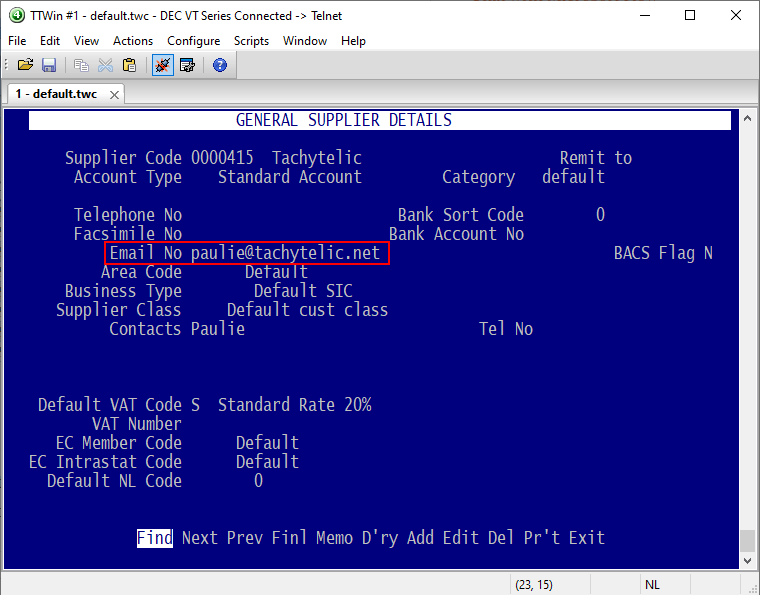
I investigated and thought it should be possible. TTwin uses VBA engine provided by WinWrap . It is easy to capture the contents of a fixed portion of the screen, but the email address could be anywhere in the display. A slight complication.
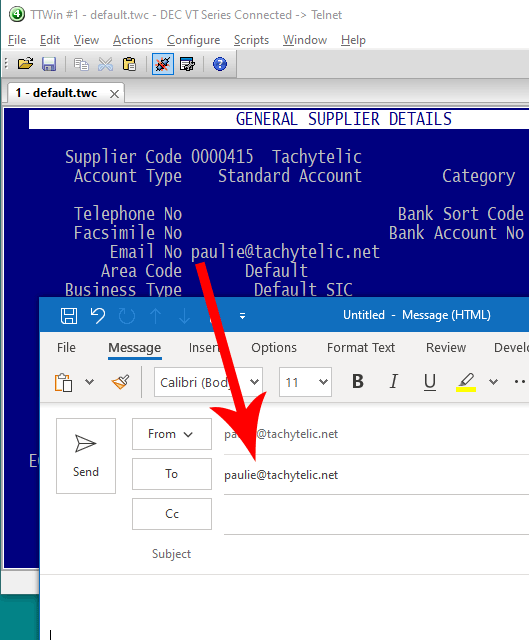
So I write a script which could be activated by a mouse shortcut (which is quite a neat feature of this emulator). The script scans the screen for email addresses and then initiates the default mail client on the PC to send an email. Here is the code:
Option Explicit

Sub Main
	Dim screenContents() As String, emailAddress As String
	ScreenContents = getScreenContents(24, 80)
	emailAddress = findEmailOnScreen()
	If emailAddress <> "notFound" Then
		Shell ("rundll32.exe url.dll,FileProtocolHandler mailto:" & emailAddress, 1)
	End If
End Sub

'Function to search for an email address on screen
Function findEmailOnScreen() As String
	Dim ScreenContents() As String, Screenline() As String
	Dim regExp As New RegExp, i As Integer, j As Integer
	ScreenContents = getScreenContents(24,80)

	With regExp
		.Global = True
		.Multiline = True
		.IgnoreCase = True
		.Pattern = "((?:[A-Z0-9_%+-]+\.?)+)@((?:[A-Z0-9-]+\.)+[A-Z]{2,4})$"
	End With

	For i = 0 To UBound(ScreenContents)
		Screenline() = Split(ScreenContents(i), " ")
		For j = 0 To UBound(Screenline)
			If(regExp.Test(Screenline(j))) Then
				findEmailOnScreen=Screenline(j)
				Exit Function
			End If
		Next
	Next

	findEmailOnScreen = "notFound"
End Function

'Function to get the entire contents of the screen as an array
Function getScreenContents(Height As Integer, width As Integer)
	Dim screenLines() As String
	ReDim screenLines(Height)
	Dim lineText As String, count As Integer

	Do
		TTWin.DispReadText  count,0,lineText,width
		screenLines(count) = lineText
    	count=count+1
	Loop Until count = Height
	getScreenContents=screenLines()
End Function
It works like this:
- Loads each line of the display into an array
- Splits each line of the array by the space character into another array.
- Uses regex to see if any element of the array looks like an email address
- Opens the default mail client if a match is found using rundll32.exe
The script could be improved but it works well and it is a decent start.
TinyTerm has the same scripting engine as TTWin 4, I tried and failed to create the same function with TinyTerm. I am sure it is possible, but the programmers documentation wasn’t clear to me.
This is the first time I have used TTWin, it seems like a really good product, things I like about it:
- Multiple sessions support is good with thumbnails in a dedicated panel.
- Scripting engine is easy to get to grips with.
- Hot spots, keyboard and mouse events are easy to setup to provide quick automation.
- The macro recorder is easy to use and works well.
The programmers documentation could be better, more example code would help a lot.
Do you have a text based legacy system? If so I offer lots of ways to enhance and modernise, just get in touch to discuss your requirements.
Leave a Reply