
It’s very easy to check if a file exists with Powershell and take an action if so, here are some examples:
Check if a file exists
$fileToCheck = "C:\tmp\test.txt"
if (Test-Path $fileToCheck -PathType leaf)
{
    #do some stuff
}
Delete file if it exists
$fileToCheck = "C:\tmp\test.txt"
if (Test-Path $fileToCheck -PathType leaf)
{
    Remove-Item $fileToCheck
}
An even shorter method….
$fileToCheck = "c:\tmp\test.txt"
Remove-Item $fileToCheck -ErrorAction Ignore
Check if a file exists and get the content
$fileToCheck = "C:\tmp\test.txt"
if (Test-Path $fileToCheck -PathType leaf) {Get-Content $fileToCheck}
Check if a file exists and print a message if it does or does not exist
$fileToCheck = "C:\tmp\test.txt"
if (Test-Path $fileToCheck -PathType leaf)
{"File does Exist"}
else
{"File does not exist"}
Check if a file exists and show the properties of the file
$fileToCheck = "C:\tmp\test.txt"
if (Test-Path $fileToCheck -PathType leaf)
{
    $file = Get-Item $fileToCheck
    $file.FullName
    $file.LastAccessTime
    $file.Length
    $file.Extension
    #etc...
}
Check if a file exists and move it to a new location
$fileToCheck = "C:\tmp\test.txt"
$newPath = "c:\tmp\newFolder"
if (Test-Path $fileToCheck -PathType leaf)
{
    Move-Item -Path $fileToCheck -Destination $newPath
    "$fileToCheck moved to $newPath"
}
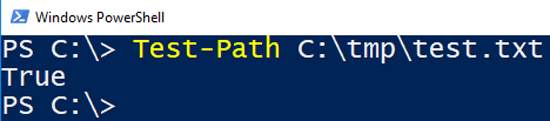
It’s obvious from the above examples that Test-Path simply returns a Boolean (i.e. True or False) and executing it on its own will produce exactly that:
The PathType parameter is not strictly required, but it is useful if you want to be sure the check you are performing is actually a file, not a directory.
You can check for a directory by setting PathType to “container”
Mister-X says
Hi
Nice, is there a command to check the content of a file ? I download a file and at the end of this file is the command: Copying finished
I would like to have an email sent, when this command appears, is it possible ?
Thanks for help
Miek says
How would you search the entire computer for the presence of a file when the path is not known?