
I built a flow to generate PDF files, and the output was perfect, but they were too large.
So, I wrote an Azure function that would allow me to optimise the PDFs and it worked well enough that I decided to write a custom connector for it.
There are a few tools out there that already provide these functions but most require a paid plan or sign-up process. I didn’t feel like subscribing to another API, I just wanted a free action that does the job reliably.
So I built it….
Then expanded it into a toolkit
After I had created the optimise action it worked so well that I decided to expand it out a bit with the other actions that I often need.
So it is now a small suite of tools, with a Power Platform connector, and now I am sharing it with anyone that uses Power Platform.
- Completely Free PDF Tools
- No API key required
- Just add it to your Power Automate Flow.
It’s a serverless Azure Function App, fronted by CloudFlare, so it’s reliable, scalable and easy to expose as a connector for Power Automate.
What can the PDF Tools connector do?
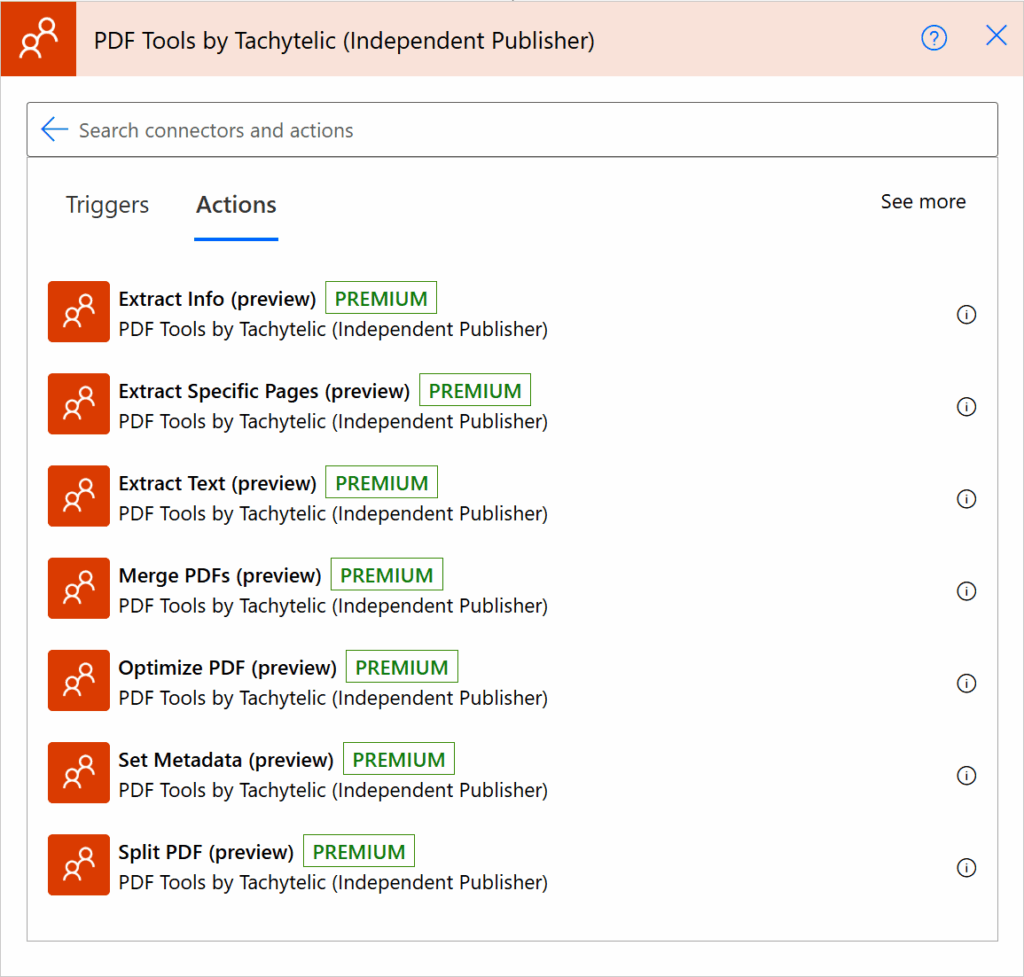
Right now, the connector has these actions:
- Extract PDF Info – Get metadata like title/author, page count, whether it’s encrypted, etc.
- Extract Pages – Create a new PDF from a page range (e.g.
1-3,7) - Extract Text – Pull out the text content (optionally page ranges)
- Merge PDFs – Combine multiple PDF files into one
- Optimize PDFs – compress/clean PDFs to reduce size
- Set Metadata – write title/author/keywords and other properties into a PDF
- Split PDF – split by number of pages or specified ranges
I may add more functionality if there is demand and people are finding the connector useful.
Why is it free?
Mostly because I feel like making it free, but also because I feel like some of these things are simple requirements and the product is better for having them available.
So, have a play with it, and please let me know in the comments what you think.
This connector is, and will remain, completely free. If it saves you some time or a premium licence and you’d like to say thanks, you can buy me a coffee. I’m glad it’s useful either way.
Free PDF actions for Power Automate · rolling 90-day activity
robby Atkins says
Hi Paulie, very interested in pdf tools, where do i download it at?
Paulie says
You don’t download it, check out the blog post, you’ll find it in the connector library within Power Automate.
Oliver says
Hi Paulie, it’s great of you to offer this for free. But surely you pay for hosting that function and/or for the resources it uses? So if all of a sudden thousands of people start using this every month, your costs will go up, no? How is that sustainable for you?
I’m asking because having a free “merge PDF” action would be very interesting for us to cut back on the paid connector we currently use. But if making this available for free isn’t sustainable for you in the long run, then it may not be a good idea for an organization to change their flows to make use of your connector. Because you may be forced to start charging for it if more people start using it, which would be completely understandable, but from an organization’s standpoint then that means all of a sudden you have yet another monthly subscription to keep your flows running.
Paulie says
I do pay for the resources that it requires, but I pay very little. A million executions per month would cost me around £5. But my advice to you if you are concerned about it would be to simply run the functions yourself on your own tenant and then you’d have a private tool for use in your own organisation at very little cost. I am freelance and could help you set it up and share the code with you. Please just get in touch if that is something that would be of interest to you, otherwise, enjoy the free version!
Shawn says
This is amazing, thank you for sharing this contribution. The only requests I can think of are short: First, ability insert a new page into a PDF (like to add covert sheet based on HTML). The ability to merge PDFs may already cover this case if used with an action to create the initial PDF first. And second, the ability to add a stamp/watermark to a PDF.
Paulie says
I will look into the watermarking. I think your insert action could be covered by the merge, but could be made more straightforward with a dedicated action. Glad you are finding it useful!
Mr.SJY says
Big thanks for this Paulie!!!
May i just ask if there’s a way on merging pdf files where the content/page(s) of the 2nd file will be inserted on specific page (before or after) of the first file?
Mr.SJY says
Got an issue:
You don’t have a current Power Apps plan. Ask your admin for one, or start a free trial.
Premium APIs used by the app: shared_pdftoolsbytachytelic
Do we have to pay now?
Mr.SJY says
I think I understand the issue.
It still requires Premium license of power automate in order to connect in PowerApps canvas app.
Thanks again for the amazing work!
Mark Pederson says
Paulie,
This is an incredibly valuable and generous contribution to the Power Platform community, for which I’m very grateful!
There is a function that I think would greatly improve the PDF Split connector:
“split pages by file size”
Since flows have such a limited capacity to process larger PDFs, this would be a remarkable addition!
Thank you!
Paulie says
It’s actually a good idea, so you would want it to split whenever it would go over a certain size? like give you back multiple PDFs of a given size? like 5MB or 10MB etc?
Mark Pederson says
Yes—split a file by the number of pages that fit within a certain threshold, like 20MB (since 25 MB is the limit within PA). There’s currently no connector that I’ve found that even does this to my knowledge and I’m not even sure of how it can even be done programmatically with some semblance of efficiency.
Marr says
Would be amazing if you add the functionality of converting Word, html, etc files to PDF.
Either way thanks for your generous contribution.
Paulie says
That is coming really soon (it is already done, just waiting for Microsoft to approve the update)
Paulie says
Check out my pull request here. There is an action that will either convert a web page to PDF, or provided HTML to PDF:
Ulrik Pettersson says
Hi,
First of all, I would like to say that I really like your tool. It works very well, and I especially appreciate that it is available free of charge.
I have a question regarding the data that is sent to your solution. How long is the data stored, and where is it stored? I was unable to find this information in your documentation or on your website.
We have built a solution around your tool, and it has become an important component in our process. Because of this, it is crucial for us to understand how you handle data retention, security, and service continuity in the event of an outage or other issues affecting the platform.
Could you provide some additional information on these topics?
Thank you, and keep up the great work!
Best regards,
Ulrik Pettersson
Paulie says
Hi Ulrik,
Thank you, that’s really good to hear, and it’s a very fair question to ask.
Your files: they are never stored, anywhere. The service is stateless. The file arrives, it is processed entirely in memory, and the result goes straight back in the response. Nothing is written to disk, nothing goes into a database or blob storage, and nothing is queued between requests. Once the response is sent there is nothing left of your document.
What is kept: ordinary request metadata, and I’d rather be precise about this than just say “nothing”. Cloudflare records one log line per request with the timestamp, which action was called, the status code, how long it took, the country and the calling IP address. That is kept for about 7 days. Separately I keep aggregate counters (action, status, country, duration, no IP) for about 90 days, which is what drives the usage figures I publish. No filenames and no file content are logged in either case.
Where it runs: the Function App is currently hosted in Azure East US, with Cloudflare in front of it. I want to flag that clearly rather than bury it, because if you are in the EU it means your documents are being processed outside it, and that may matter for your own compliance position even though nothing is retained. Worth checking before you build any further on it.
Security: there is no account, no sign-up, no API key and no user database, so there is very little to attack and nothing at rest to steal. All traffic is over HTTPS.
Continuity: here I should be straight with you, because you’ve told me this is now important to your process. This is a free service I run in my own time. There is no SLA, no uptime guarantee, no support commitment and no promise about how long it will keep running. I have no plans to switch it off and the platform underneath it is reliable, but I would be doing you a disservice if I let you treat that as a guarantee. It comes with exactly the assurances you would expect for the price.
Given how much you’re relying on it, the option worth discussing is running your own instance. The connector stays free to use as it is, and that isn’t changing. The source itself isn’t something I publish, but for anyone with a real requirement like yours I’m happy to provide access to the repository, get it deployed into your own tenant and adapt the custom connector to suit how you work. That gives you your own region, your own availability target and no dependency on my hosting. It’s a commercial arrangement rather than part of the free offering, but if it would be useful, get in touch and we can talk it through.
Thanks again for the kind words, and for asking the right questions.
Best regards,
Paul
Keith says
Hi, thanks so much for developing such great tools! When I try to add one of the actions for the first time, I get this error: The requested content does not exist.
HttpStatusCode: 404
ErrorCode: WebContentNotFound
RequestId: [xxxxxx]
TimeStamp: [xxxxxx]
I am able to use the action but then the flow run fails with BadGateway.
Happy to discuss further if needed, I can’t attach a screenshot here.