
If you run a business on Xinuos SCO OpenServer, you already know the shape of this problem. The application works. It has worked for twenty years. But everything it produces comes out as plain, fixed-width text: invoices, delivery notes, statements, picking lists, end-of-day reports. That text was designed for a line printer, and a line printer is often still where it goes.
Getting any of it into a PDF – one you can email to a customer, archive, or put on headed paper, is where it gets awkward.
There are now two good ways to do it, and this page covers both:
- A web service. Pipe your text to an HTTPS endpoint with curl and get a PDF back, optionally printed straight onto your own letterhead. Nothing to install beyond curl.
- Local binaries. a2ps and Ghostscript, compiled for OpenServer 5, producing PDFs entirely on the box with no network involved at all.
They solve slightly different problems. There is a section below on which one fits your situation.
Route one: the PDF service
The quickest way to get branded PDFs out of OpenServer is to stop asking the box to do it. Pipe the print stream to an HTTPS endpoint and get a finished PDF back.
spool2pdf is built for exactly this. It takes fixed-width text, the sort lp has been producing since the 1980s, and renders it onto a PDF of your letterhead or pre-printed form, keeping every character in the column it was printed in. Nothing is installed on the server.
The whole thing is one command:
cat /usr/spool/lp/tmp/statements.txt | curl --data-binary @- \
  'https://api.spool2pdf.app/api/render?paper=A4&pointSize=9&encoding=cp850' \
  -o statements.pdf
The parts that matter on OpenServer specifically:
- Code pages. Output is normally cp850 or cp437 rather than UTF-8, so box-drawing characters and pound signs come through as themselves instead of question marks.
- Form feeds. A form feed breaks the page, and the ejects at the start and end of a spool file are treated as ejects rather than as blank sheets.
- Letterhead. Supply a PDF of your headed paper, or a scan of your pre-printed stationery, and the text lands on it registered to the millimetre.
- Splitting. Break one print run into separate documents at a marker line, such as a statement number.
There is a tuning tool where you can upload one of your own spool files and your form, nudge the margins until the columns sit inside the boxes, and copy the exact command out. That is the fastest way to find out whether it will work with your output, and it needs no account.
Two things to weigh before choosing this route.
The first is that your documents leave the building. For plenty of shops that is unremarkable; for some it is out of the question, which is what route two is for.
The second is TLS. The curl that shipped with OpenServer 5 is old enough that it may refuse to negotiate with a modern endpoint. If it will not connect, either use a current build (see my SCO OpenServer 5 binaries) or copy the file to a more modern box and make the call from there.
Branding the PDF
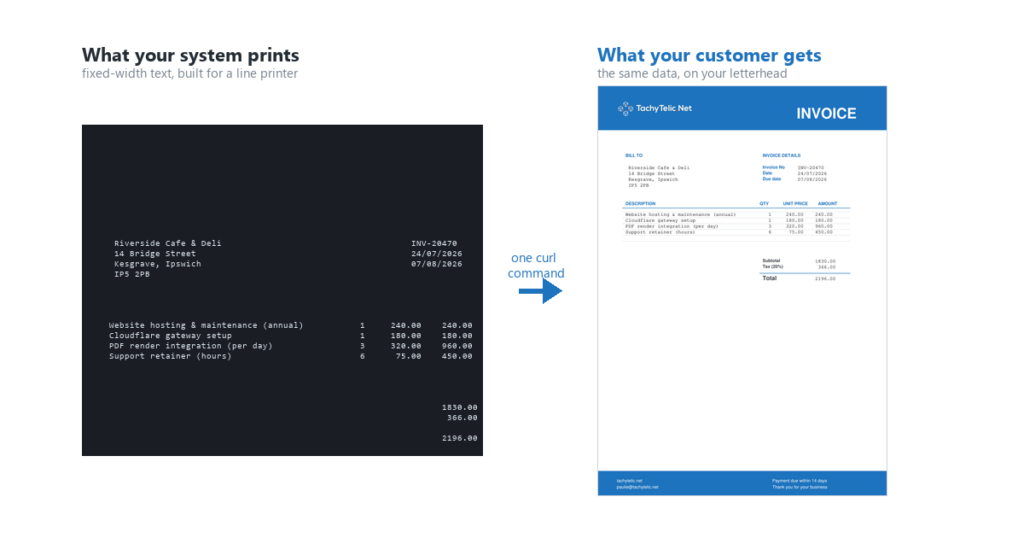
A plain PDF of monospaced text is useful, but it is not something you would send to a customer. This is where it gets interesting, and where you can start retiring pre-printed stationery.
Attaching a file means switching from the one-liner above to a multipart form, so the shape of the command changes slightly. Design your letterhead once as an ordinary PDF (Word, Canva, whatever you like), keep a copy on the SCO box, and hand it to curl as the canvas:
cat invoice.txt | curl -s \
  -F "text=@-" \
  -F "[email protected]" \
  -F "lines=66" \
  -F "encoding=cp850" \
  https://api.spool2pdf.app/api/render \
  -o invoice.pdf
Your fixed-width data lands in the right places on your headed paper. The output looks like your real stationery, produced by the same application that has always produced it.
It works just as well with a form you already have printed. Scan one blank sheet at 300dpi, save it as a PDF, and the text drops into the boxes somebody else drew years ago.
Getting the layout right
Fixed-width output has its quirks, and a handful of settings deal with all of them:
linessets the page length. Match it to your source (66 is common) so each printed page maps to one PDF page.encodingtells it how to read your bytes. If your reports draw boxes and tables with line characters, they are almost certainly in an old code page.cp850covers most of it.skipEachPageblanks a header line that repeats at the top of every page, if your spool format has one.topMarginandleftMarginshift the whole grid, in points. These are the two you adjust to line the text up with a letterhead.splitOnstarts a new document at every line carrying a marker, such as a statement number, for breaking one run into separate files.
Working these out by trial and error over an SSH session is miserable, so do it once on your PC instead. The tuning tool takes a sample of your output and your letterhead, shows you the rendered result as you nudge the settings, and hands you the finished command to paste into your script.
Route two: generating PDFs on the box itself
The service needs the SCO box to be able to reach the internet. Plenty of them can’t, or aren’t allowed to, and some sites simply won’t have a production server calling out to anything. For those, the whole job can now be done locally.
Two binaries do it, both compiled natively for OpenServer 5 and available from the binaries page:
- GNU a2ps turns plain text into properly formatted PostScript – paginated, with headers, borders and optional line numbering.
- Ghostscript 9.06 turns that PostScript into a PDF. It is a single self-contained binary with no external dependencies.
Chained together, that is the whole pipeline:
a2ps report.txt -o - | \
  gs -q -dNOPAUSE -dBATCH -sDEVICE=pdfwrite -o report.pdf -
Text in, PDF out, no network.
Matching your report layout
The a2ps options that matter for legacy spool output:
a2ps report.txt \
  --lines-per-page=66 \
  --columns=1 \
  --portrait \
  --medium=A4 \
  --no-header \
  -o - | gs -q -dNOPAUSE -dBATCH -sDEVICE=pdfwrite -o report.pdf -
--lines-per-pageis the equivalent of the service’slinessetting. Match it to your spool format.--columns=1stops a2ps helpfully putting two pages side by side, which it will do by default.--no-headerremoves a2ps’s own title bar, which you rarely want on a document that already has its own headings.--interpretcontrols whether form feeds and tabs are acted on. If your pages are breaking in the wrong places, this is the setting to look at.
One honest limitation: a2ps is an 8-bit-era tool, and its handling of old DOS code pages is more limited than the service’s. Run a2ps --list=encodings to see what your build supports. If your reports lean heavily on cp850 line-drawing characters, test this carefully before committing to the local route.
Printing it
Ghostscript also solves a problem that has nothing to do with PDFs: printing to a printer that does not speak PostScript. Most printers bought in the last decade don’t. Ghostscript includes around 380 printer drivers, so it can rasterise a document for whatever is actually on the network:
# PostScript printer on port 9100
a2ps report.txt -o - | bash -c 'cat >/dev/tcp/192.168.1.50/9100'

# PCL printer — rasterise first
gs -q -dNOPAUSE -dBATCH -sDEVICE=ljet4 -r600 -o - report.pdf | \
  bash -c 'cat >/dev/tcp/192.168.1.60/9100'
This uses bash’s /dev/tcp pseudo-device, which is why bash is on the binaries page too.
Which route should you use?
The dividing line is the letterhead.
Use the service when the document is going to a customer and has to look like your stationery. Overlaying fixed-width data onto a letterhead PDF with Ghostscript alone means hand-written PostScript and pdfmarks, and maintaining that on a production box is exactly the sort of thing you were trying to avoid. The service also copes better with legacy code pages, needs nothing installed beyond curl, and lets you redesign your letterhead without ever touching the legacy server.
Use the local binaries for operational output — internal reports, listings, picking notes, audit copies. Anything that needs to be a clean, readable PDF but doesn’t need to look like headed paper. No network, no external dependency, no rate limit. If the box has no outbound internet access, this is the only route.
Use both where it makes sense. Generate the branded PDF through the service, then use Ghostscript locally to print it on whatever printer is attached.
What to do with the PDF
Once the SCO box can produce a PDF on demand, a lot opens up:
- Email it. Pipe it out through your mailer and the customer gets a proper invoice instead of a posted printout.
- Use cURL to send it to a web service of your choice for further automations.
- Archive it. Keep a dated copy on a modern share via rsync, so you have a real record that is not tied to the old line printer.
- Retire the printer. Deliver documents as files instead of paper.
- None of this replaces the application. It sits alongside it, using the plain text it already produces.
The same curl that made the PDF can post it straight to another service. Once the box can make an HTTPS request, the whole modern automation world is in reach:
- Drop the file into SharePoint or OneDrive with Microsoft Graph.
- Kick off a Power Automate or Zapier flow.
- File it in a document system.
- Hand it off to your own API.
The SCO box stops being an island.
Prefer it done for you?
Everything above is the do-it-yourself route, and for plenty of people that is exactly right.
If you would rather not build and maintain it, DocuSwift is the same idea as a finished product. It captures the print output, generates a fully branded PDF, and puts it into a Microsoft Teams app stored in your own Office 365, indexed so you can find any document later, with optional automatic sending to your customer or supplier.
This page shows how to do it with curl. DocuSwift is the same job, done for you or get in touch to discuss your specific requirements.
It is not only for SCO
The service is deliberately generic. It does not know or care that the text came from SCO.
Any legacy system that produces fixed-width output can use it the same way: old ERPs, accounting packages, spool files saved as text, anything that still prints to a line printer.
There is also a Power Platform connector, PDF Tools by Tachytelic, if you want the same rendering inside Power Automate. But for a legacy Unix box, the curl one-liner is the whole story.
Using it in production
You can call the endpoint without a key, which is enough to work out your settings and prove it does what you need.
Once it is part of a real business process, get a free key. It takes a few seconds at spool2pdf.app and it gives you a proper allowance rather than the small one anonymous callers share. Nothing about the call changes except the header:
cat invoice.txt | curl -s \
  -F "text=@-" \
  -H "x-api-key: your-key-here" \
  https://api.spool2pdf.app/api/render \
  -o invoice.pdf
Need help modernising a legacy system?
This is one small example of what becomes possible once a legacy system can talk to a modern endpoint.
I work with SCO OpenServer and other legacy platforms, and a great deal of that work is exactly this: taking something that still runs the business and quietly giving it modern capabilities, without the risk of a rip-and-replace.
If you have an old system producing output you wish you could do more with, get in touch or for more information see my SCO OpenServer Support Page.